
Finder Settings Enhancements
With just a few tweaks, let's make Finder more awesome than it already is.

[jwplayer player="1" image="http://macdojo.com/wp-content/uploads/2015/03/yosemite-thumbnail.jpg" sources="{ file:'rtmp://s328aenrh4lmam.cloudfront.net/cfx/st/mp4:findersettings.mp4', label: 'Desktop' },{ file:'https://s3.amazonaws.com/yosemitedojo/findersettings.mp4', label: 'Mobile' }"]
UPDATE: Tuesday, July 28, 2015
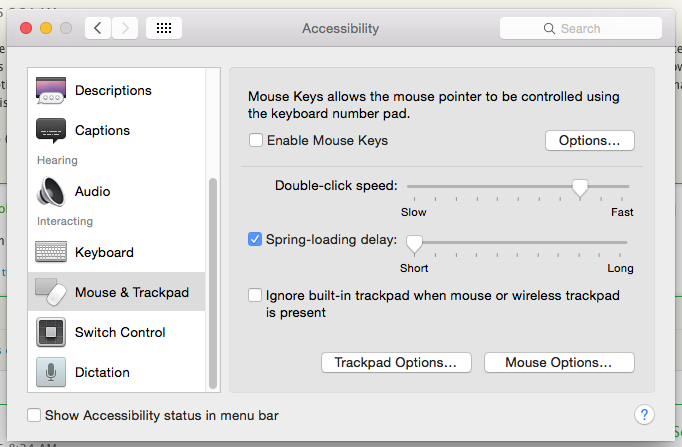
Yosemite changed the location of spring loaded folders. It's now under System Pref > Accessibility > Mouse / Trackpad.
Main Points:
- Set Default Folder to Desktop
- Set Spring Loaded Folders to MAX
- Turn on Status Bar
- Increase font size (⌘+J view options)
- Why column view is best view (⌘+3)
Leave your ninja related questions and comments below...
Training Information
Action Tips: Checkout the tweaks in the description and then go change your Finder Settings to your own highest delight.

2 Comments
Les
April 21, 2016Hi it would seem that the spring loading feature is no longer available in el capitan unless it’s been moved again but it’s not under mouse or trackpad now two different items in system preferences. Also and this is really frustrating me I use the move function in windows all the time what is the mac equivalent to windows cut & paste
Tharyn
April 21, 2016Hi Les, Thanks for asking!
Spring Loaded folders option and settings are under System Preferences > Accessibility > Mouse & Trackpad. I have the latest version of El Capitan and I can see this function here. Let me know if you still can’t find it.
Also, for the move function, you can highlight and drag and drop as many files as you want in finder and this will Move them from one directory to another.
However, if you pickup an item and start dragging it, THEN push+hold OPTION, you will duplicate the file in the new location. This is a copy and paste as opposed to a cut and paste.
There is no ⌘ + X to cut files and paste them in the file system, only highlighting and moving them with your mouse. Hope that helps!
-Tharyn
You must be logged in to post a comment.